
webhooks
Send site events to external systems over HTTPS. Use webhooks for Slack, Discord, PagerDuty, CI/CD, or any receiver that can validate a signed JSON POST.
Locations: admin panel -> webhooks, settings -> webhooks
surfaces and access
| surface | route | who uses it | shipped controls |
|---|---|---|---|
| admin panel -> webhooks | /admin/webhooks | superadmins managing webhooks across sites | site selector, add webhook, enable/disable switch, edit, test, delete |
| settings -> webhooks | /settings/webhooks | users managing webhooks for a site they can administer | create webhook, pause/resume, rotate secret, delete, delivery history, delivery retry |
The admin panel is the cross-site control surface. If more than one site is available, choose the site first, then manage that site's webhook list. Members without webhook-management permission should treat the page as read-only; create, edit, delete, retry, and secret rotation require site write access.
creating a webhook
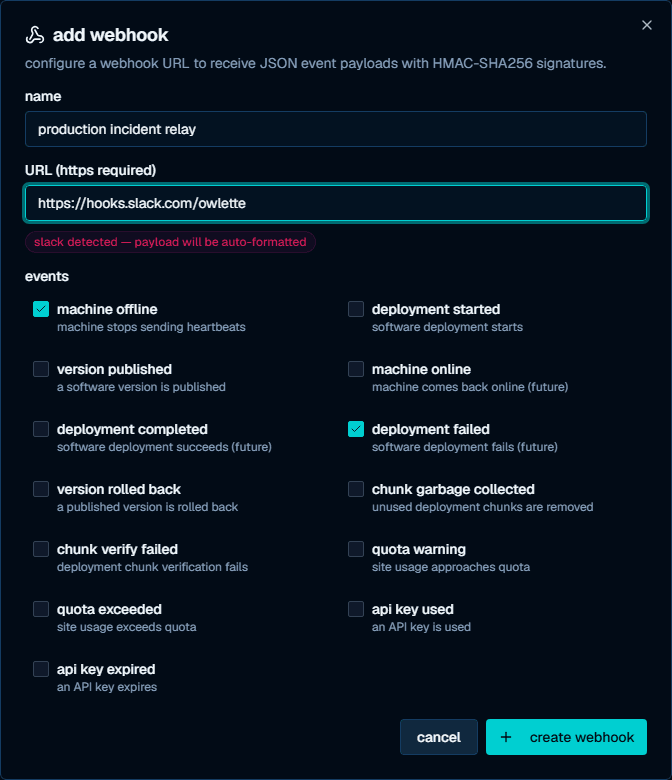
From the admin panel:
- Open admin panel -> webhooks.
- Select the site, if the selector is shown.
- Click add webhook.
- Enter a name, an HTTPS URL, and at least one event.
- Click create webhook.
- Copy the signing secret from the webhook created dialog.
From site settings:
- Open settings -> webhooks.
- Select the site, if prompted.
- Click create webhook.
- Enter an endpoint URL, optional description, and one or more events.
- Copy the signing secret from the banner shown after creation.
Signing secrets are shown once when a webhook is created. They are not returned by the list, detail, or edit endpoints.
event catalog
The subscription UI accepts the current roost webhook event catalog:
| event | description |
|---|---|
version.published | A roost version is published |
version.rolled_back | A roost version is rolled back |
deployment.started | A deployment rollout starts |
deployment.completed | A deployment rollout completes |
deployment.failed | A deployment rollout fails |
machine.online | A machine reports online again |
machine.offline | A machine is reported offline |
chunk.garbage_collected | Unused chunk data is removed |
chunk.verify_failed | Chunk verification fails |
quota.warning | Site usage approaches quota |
quota.exceeded | Site usage exceeds quota |
api_key.used | An API key is used |
api_key.expired | An API key expires |
Older process and connection-failure alert names are not part of this subscription catalog.
delivery status
Webhook cards show the endpoint URL, selected events, enabled or paused state, last delivery time, last delivery status, and failure count when available.
In the admin panel, the test action sends a synthetic test payload to the selected webhook and writes the result back to the card. Use it to check that the URL is reachable; it does not prove automatic roost event dispatch is enabled.
In settings -> webhooks, expand a card to view recent deliveries. Delivery history is retained for 30 days. Failed or pending records can be retried from the expanded delivery list.
managing webhooks
| action | admin panel | settings page |
|---|---|---|
| Enable, disable, pause, or resume | switch on each row | pause/resume button |
| Edit URL or event selection | pencil button | recreate or use API edit flows |
| Test endpoint reachability | test button | use /api/webhooks/probe or the CLI trigger flow |
| Rotate signing secret | not shown | rotate-secret button; the old secret remains valid for 24 hours |
| View delivery history | not shown | expand the webhook card |
| Retry a delivery | not shown | retry button in recent deliveries |
| Delete | trash button, then confirm | trash button, then confirm |
Deleted webhooks stop receiving deliveries. Delivery history is preserved for the 30-day audit window.
receiver verification
The current webhook API and probe flow sign requests with:
Roost-Signature: t=<unix-seconds>,v1=<hex>Verify the signature against the exact raw request body and reject signatures outside the five-minute replay window. Use the receiver examples in API webhooks for implementation details.
The admin panel's legacy test path may send generic test requests with an
X-owlette-Signature: sha256=<hex> header. If you use that button while
building a generic receiver, strip and validate the sha256= prefix before
constant-time comparison.
preview limits
Subscription management, one-time secret display, secret rotation, delivery history, manual retry, and probe testing are live. Automatic production dispatch for the roost lifecycle event catalog is still being wired, so use probe or CLI trigger flows when validating a new receiver before relying on automatic event delivery.
Use email alerts for human notification paths and webhooks for automation that can tolerate at-least-once delivery and deduplicate by delivery id.
email alerts
Owlette sends email notifications for machine health, process, threshold, hoot, and display-event alerts. Superadmins manage alert rules in Admin Panel -> alerts (/admin/alerts) and test email delivery in Admin Panel -> email (/admin/email). Individual recipients manage their own delivery preferences in account settings -> alerts.
owlette API overview
the owlette public API lets you automate fleet operations from scripts, CI, internal tools, and SDKs. use it to inspect sites and machines, queue commands, manage deployments, publish roost content, run hoot diagnostics, manage webhooks, and read logs.