
email alerts
Owlette sends email notifications for machine health, process, threshold, hoot, and display-event alerts. Superadmins manage alert rules in Admin Panel -> alerts (/admin/alerts) and test email delivery in Admin Panel -> email (/admin/email). Individual recipients manage their own delivery preferences in account settings -> alerts.
alert categories
| category | trigger | preference gate | delivery path |
|---|---|---|---|
| Machine offline | A previously online machine has a heartbeat older than 5 minutes | healthAlerts | GET /api/cron/health-check sends per-site emails and respects a 1-hour per-machine cooldown |
| Agent connection failure | The agent posts a connection_failure event | healthAlerts | POST /api/agent/alert sends immediately, subject to the agent-alert rate limit |
| Process crashed | The agent posts process_crash for a monitored process | processAlerts | POST /api/agent/alert queues the event; GET /api/cron/process-alerts sends a digest |
| Process failed to start | The agent posts process_start_failed | processAlerts | Same process-alert queue and digest path |
| Threshold alert | A saved metric rule is breached | thresholdAlerts | Cloud Functions evaluates rules and calls POST /api/alerts/trigger |
| hoot escalation | Autonomous hoot cannot resolve an issue and marks an escalation pending | cortexAlerts | POST /api/hoot/escalation or cron-style GET /api/hoot/escalation sends escalation emails |
| Display event | A routed display event needs email delivery | displayAlerts | POST /api/agent/alert sends critical display emails immediately or queues a display digest |
Display email delivery is not enabled for every display event. The current email-routed events are display_monitor_removed, display_apply_failed, display_auto_revert_fired, and display_sync_lost. display_monitor_removed and display_auto_revert_fired bypass the digest queue and send immediately; other routed display emails are drained by GET /api/cron/display-alerts.
The agent alert route also accepts exe_missing events. These are not email-routed today; they are written to sites/{siteId}/logs with action: "exe_missing" and drive the dashboard executable-missing toast.
POST /api/agent/alert accepts both the legacy flat process-alert body and the generic { "eventType": "...", "data": { ... } } shape used by current agents.
threshold alert rules
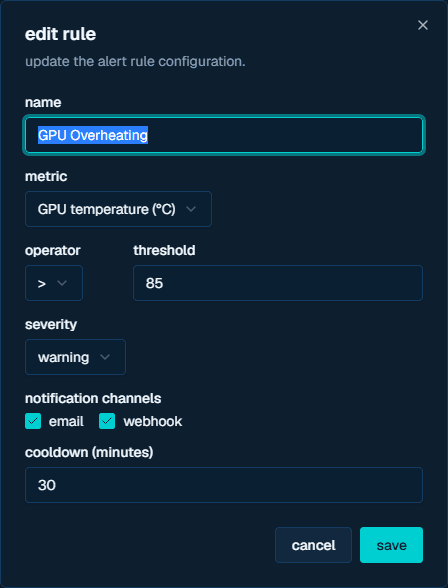
The alerts admin page (/admin/alerts) manages site-scoped threshold rules stored at sites/{siteId}/settings/alerts. A rule includes:
| field | current options |
|---|---|
| metric | cpu_percent, memory_percent, disk_percent, gpu_percent, cpu_temp, gpu_temp, network_latency, network_packet_loss |
| operator | >, <, >=, <= |
| severity | info, warning, critical |
| channel | email, webhook, or both |
| cooldown | minutes before the same rule can notify again for the same machine |
The admin page ships presets for GPU overheating, low disk, high memory, and high CPU. Saving a rule replaces the rules array through PUT /api/sites/{siteId}/alerts.
recipients and preferences
Owlette builds the recipient list from users assigned to the site plus the site owner. If no site user email is available, it falls back to ADMIN_EMAIL_PROD or ADMIN_EMAIL_DEV.
Each user's account settings -> alerts section controls:
- Machine offline alerts (
healthAlerts) - Process crash alerts (
processAlerts) - Threshold alerts (
thresholdAlerts) - hoot escalation alerts (
cortexAlerts) - Display events (
displayAlerts) - Additional CC recipients (
alertCcEmails, maximum 5) - Muted machines (
mutedMachines)
Alert preferences default to enabled unless the stored preference is explicitly false. CC recipients are added to that user's alert emails, and muted machines suppress all alert emails for that user for the selected machine. Users mute or unmute a machine from the machine context menu; muted entries can also be removed from account settings.
setup
environment variables
| variable | required | description |
|---|---|---|
RESEND_API_KEY | yes | Enables Resend email delivery |
RESEND_FROM_EMAIL | production recommended | Sender address shown by the admin email config page; falls back to onboarding@resend.dev if unset |
ADMIN_EMAIL_PROD | production | Fallback recipient and default test-email target in production |
ADMIN_EMAIL_DEV | development | Fallback recipient and default test-email target in development |
CRON_SECRET | yes for cron alerts | Shared secret for health, process, and display alert cron endpoints |
CORTEX_INTERNAL_SECRET | yes for threshold and hoot flows | Shared secret for /api/alerts/trigger, hoot autonomous flows, and the hoot escalation POST route |
cron routes
Configure the cron caller to include the expected secret header for each route:
| route | schedule used by code comments | auth header | purpose |
|---|---|---|---|
GET /api/cron/health-check | every 5 minutes | X-Cron-Secret: <CRON_SECRET> | detects stale machine heartbeats |
GET /api/cron/process-alerts | every 3 minutes | X-Cron-Secret: <CRON_SECRET> | drains pending_process_alerts after a 2-minute accumulation window |
GET /api/cron/display-alerts | every 3 minutes | X-Cron-Secret: <CRON_SECRET> | drains pending_display_alerts after a 2-minute accumulation window |
GET /api/hoot/escalation | cron-style polling | Authorization: Bearer <CRON_SECRET> | processes pending hoot escalation events (/api/cortex/escalation is a working alias) |
Threshold alerts are not drained by a cron route. The metrics Cloud Function evaluates stored rules and calls POST /api/alerts/trigger with x-internal-secret: <CORTEX_INTERNAL_SECRET>.
testing email delivery
Use Admin Panel -> email (/admin/email) to verify configuration and send template previews. The page reads current configuration from GET /api/platform/email/config, then sends the selected preview through POST /api/test-email.
The current test templates are:
testprocess_crashprocess_start_failedagent_alertthreshold_alertmachines_offlinecortex_escalationwelcomeuser_signup
The UI sends previews to the configured admin email. The API also accepts optional to and cc fields for direct admin-session calls. Event simulation is not part of the shipped email testing flow.
rate limits and cooldowns
| alert path | protection |
|---|---|
| Machine offline | 1-hour cooldown per machine via health.lastCronAlertAt |
| Process alerts | 3 per hour per machineId:processName before queueing |
| Agent alert route | 5 requests per hour per IP |
| Display alerts | 1 per hour per machine and event type; display_drift uses a 4-hour window |
| Threshold alerts | rule-specific cooldownMinutes per rule and machine |
troubleshooting
no emails received
- Check Admin Panel -> email for
RESEND_API_KEY, sender, environment, and admin email status. - Send the
testtemplate from/admin/email. - Confirm the relevant account setting is still enabled for the recipient.
- Check whether the machine is muted for that recipient.
- Verify
CRON_SECRETorCORTEX_INTERNAL_SECRETfor the route that emits the alert. - Check Railway or function logs for Resend errors.
expected process or display alerts are delayed
Process alerts and non-critical display alerts are digested. The event must be older than the 2-minute accumulation window before the cron route sends it.
duplicate alerts
Check whether multiple emitters are calling the same route. The shipped alert paths include cooldowns or rate limits, but duplicate cron schedules can still create noisy logs and unnecessary route traffic.