
configuration
The agent can be configured locally in the desktop app, remotely from the web dashboard, or by editing config.json directly. The local source file is C:\ProgramData\Owlette\config\config.json.
Desktop app and dashboard writes apply immediately; the agent picks up config changes on a polling listener with a 2-10 second interval.
When the desktop app is open, launch mode and schedule labels refresh from external dashboard or service changes. Text fields that are actively focused defer remote refresh until focus leaves.
the desktop app
The desktop app runs as a separate process from the service. Launch it from:
- System tray -> Right-click ->
open owlette - Start Menu ->
Owlette - Directly:
C:\ProgramData\Owlette\app\owlette-desktop.exe
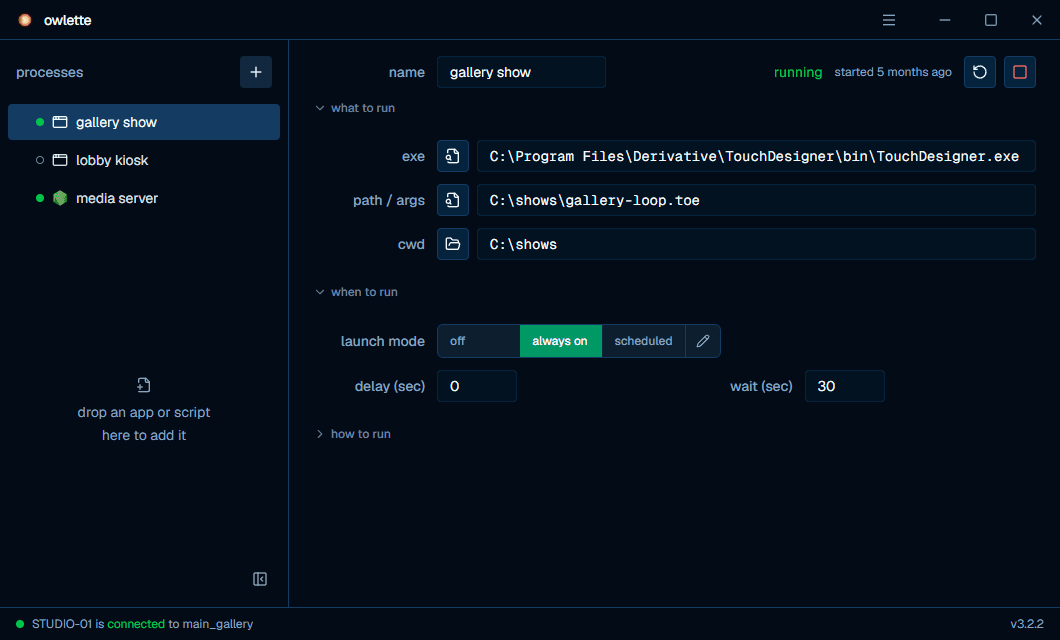
what the window shows
| area | contents |
|---|---|
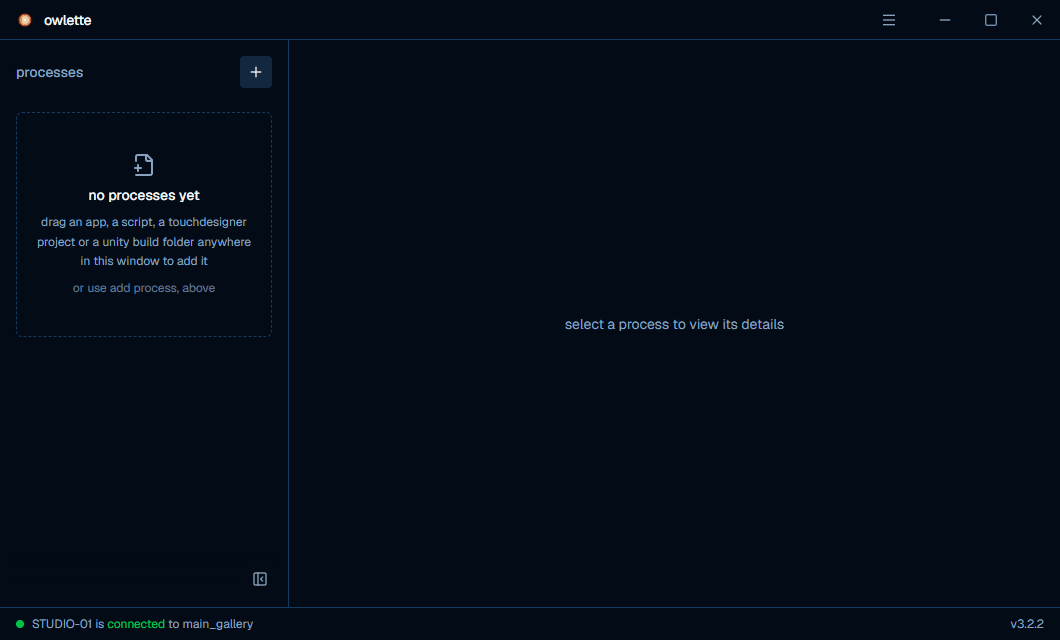
| Processes list | Every monitored process, in launch order, with a status dot from the service's live table. Drag a row to reorder; right-click one for restart, kill, duplicate, and delete. Add an entry with the + button in the list header, or drop an app, a script, a TouchDesigner project, or a Unity build folder anywhere in the window. |
| Process settings | Name, then three groups: what to run (executable path, file path or arguments, working directory), when to run (launch mode and schedule), and recovery (startup delay, initialization wait, relaunch attempts). Priority and visibility sit behind an advanced disclosure at the bottom of the form. There is no save button — a field writes itself when it loses focus or takes an enter key. |
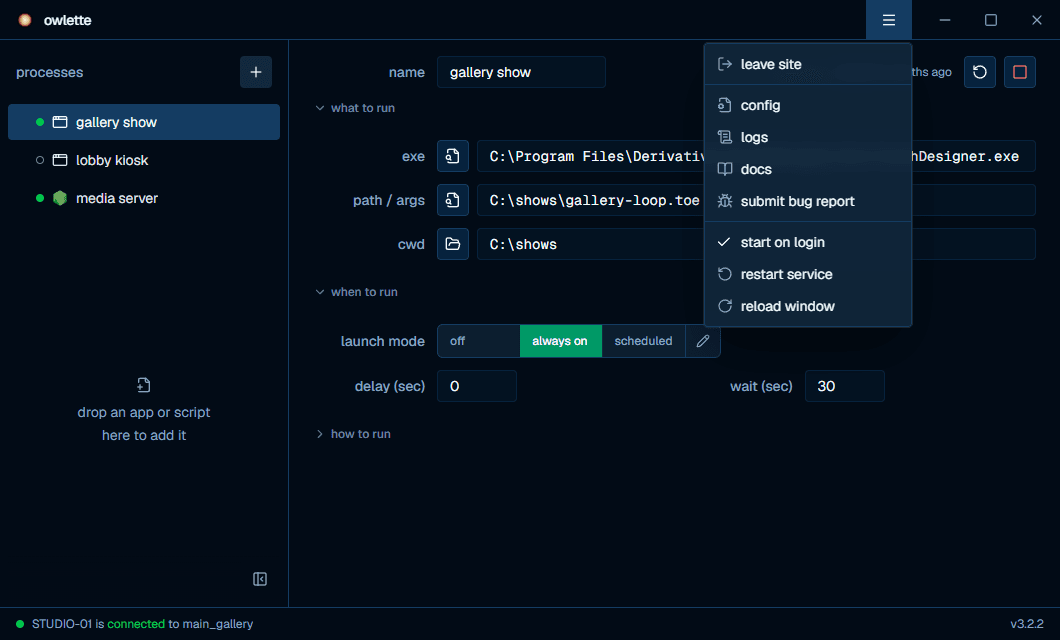
| Menu (top right) | Join or leave a site, open config.json, open the logs folder, open these docs, submit a bug report, toggle start on login, restart the service, and reload the window. |
| Footer | One sentence saying whether this machine is being supervised and which site it belongs to, plus the version of the service that is running. One button sits beside the sentence when the state calls for it: start service when nothing is supervising this machine, or join site when the service is running but the machine belongs to no site. The two are mutually exclusive. |
Nothing has been configured yet on a freshly enrolled machine:
The menu at the top right is where a machine joins its first site, or leaves the one it is on:
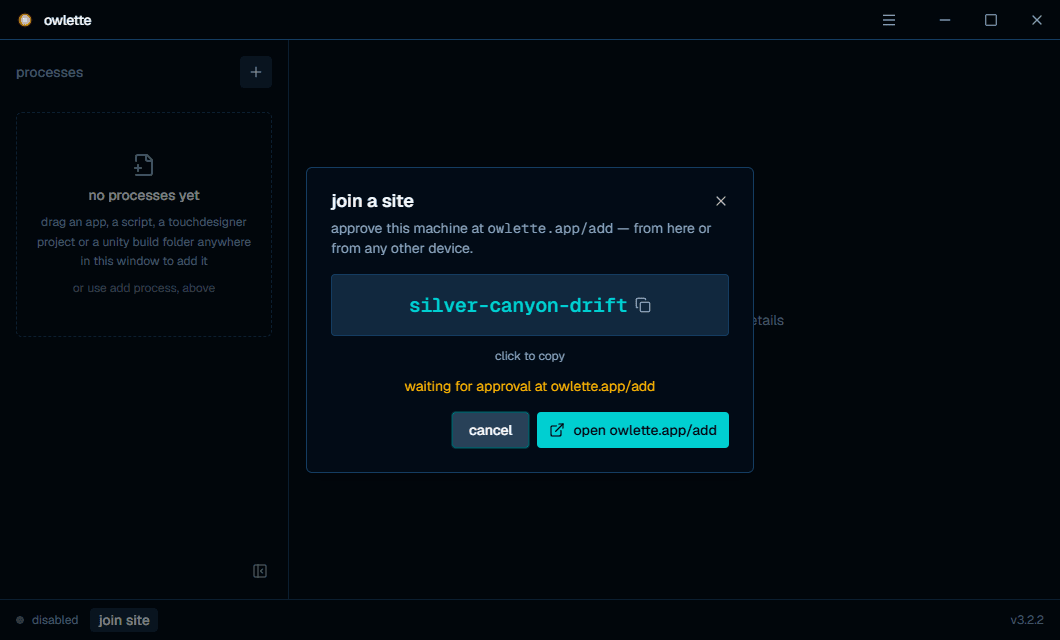
Joining shows a pairing phrase to approve from any device — the same device-code flow the installer uses:
config.json
The configuration file is stored at C:\ProgramData\Owlette\config\config.json.
When no config exists, the agent generates this default structure:
{
    "version": "1.7.0",
    "environment": "production",
    "processes": [],
    "logging": {
        "level": "INFO",
        "max_age_days": 90,
        "firebase_shipping": {
            "enabled": false,
            "ship_errors_only": true
        }
    },
    "sentry": {
        "enabled": false,
        "dsn": ""
    },
    "displays": {
        "enabled": true,
        "assigned": null,
        "auto_enforce": false,
        "remoteApplyEnabled": false
    },
    "temperature": {
        "enabled": true
    },
    "watchdog": {
        "enabled": true,
        "thresholds": {
            "failure_seconds": 360,
            "boot_grace_seconds": 180
        },
        "budget": {
            "max_per_window": 3,
            "window_seconds": 3600
        },
        "preconditions": {
            "require_internet": true,
            "fatal_error_suppression_seconds": 3600
        }
    }
}
If the agent regenerates a config and an existing firebase section is present, it preserves that section so pairing credentials are not lost.
top-level fields
| field | type | editable | description |
|---|---|---|---|
version | string | no | Config schema version. The agent upgrades older configs to the current schema. |
environment | string | yes | production uses owlette.app; development uses dev.owlette.app. |
processes | array | yes | Monitored process entries. The generator starts with an empty array. |
logging | object | yes | Local log level, retention, and optional Firebase log shipping. |
sentry | object | yes | Optional Sentry reporting settings. |
displays | object | yes | Display-topology monitoring and remote apply settings. |
temperature | object | yes | CPU/GPU temperature sensor reads (3.2.0+). enabled: false stops all sensor reads; a missing section means enabled. Takes effect within one metrics tick — no restart needed. |
watchdog | object | yes | Service watchdog thresholds, restart budget, and restart preconditions. |
firebase | object | no | Pairing and cloud-sync state. The agent may preserve or write this section, but users should not edit it manually. |
logging fields
| field | type | default | description |
|---|---|---|---|
logging.level | string | "INFO" | Log level: DEBUG, INFO, WARNING, ERROR, or CRITICAL. |
logging.max_age_days | number | 90 | Delete local log files older than this many days. |
logging.firebase_shipping.enabled | boolean | false | Sends buffered logs to Firebase when enabled. |
logging.firebase_shipping.ship_errors_only | boolean | true | When shipping is enabled, sends only error and critical logs unless set to false. |
user-editable sections
| section | keys |
|---|---|
environment | "production" or "development" |
sentry | enabled, dsn |
displays | enabled, assigned, auto_enforce, remoteApplyEnabled |
temperature | enabled |
watchdog.thresholds | failure_seconds, boot_grace_seconds |
watchdog.budget | max_per_window, window_seconds |
watchdog.preconditions | require_internet, fatal_error_suppression_seconds |
process configuration
A process's launch mode is the first thing to set: off leaves it alone, always on keeps it running around the clock and relaunches it if it crashes, and scheduled runs it inside the windows you define.
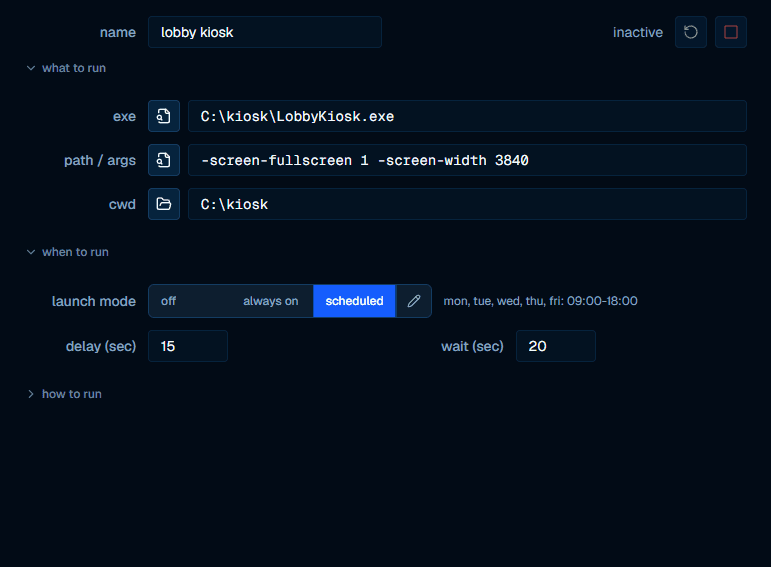
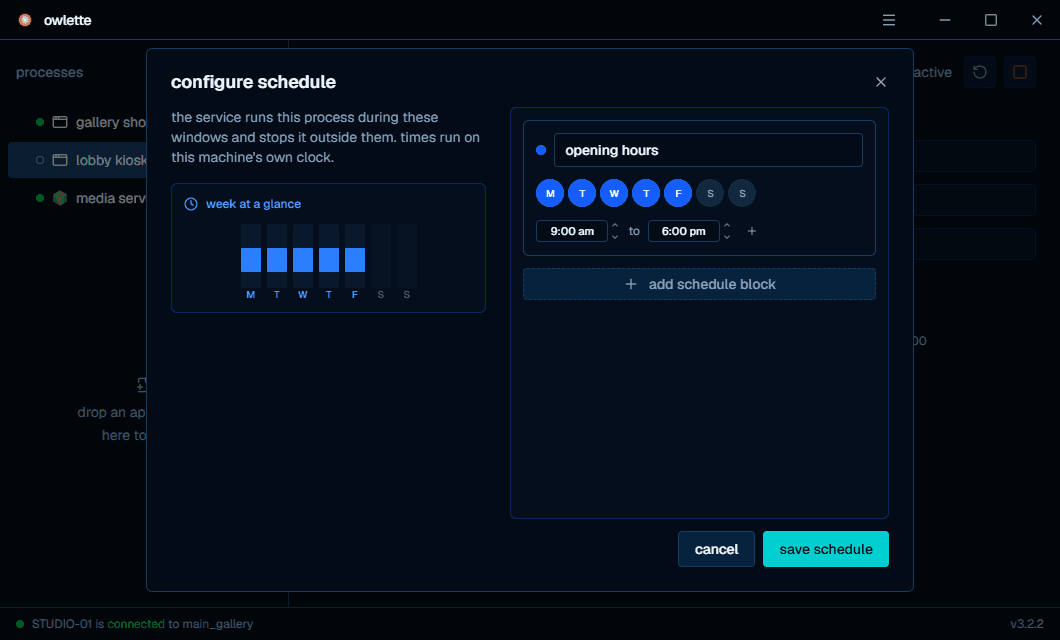
The pencil button on the right edge of the launch-mode control opens the schedule editor. It is offered in every launch mode — editing from off or always on stores the windows without changing the mode. Times follow the site's timezone, or this machine's local time when it is not paired to one:
Each process in the processes array uses the current process keys. The generator creates an empty array; entries created in the desktop app and entries created from the dashboard share most fields but are not identical.
Desktop-app-created entry:
{
    "id": "b8f1a4d2-8b1e-4df9-b7ff-7d4c3c10f9f1",
    "name": "TouchDesigner",
    "exe_path": "C:\\Program Files\\Derivative\\TouchDesigner\\bin\\TouchDesigner.exe",
    "file_path": "C:\\Projects\\MyProject.toe",
    "cwd": "C:\\Projects",
    "priority": "Normal",
    "visibility": "Show",
    "time_delay": "0",
    "time_to_init": "10",
    "relaunch_attempts": "5",
    "launch_mode": "off",
    "autolaunch": false,
    "schedules": null
}
Dashboard-created entry:
{
    "id": "b8f1a4d2-8b1e-4df9-b7ff-7d4c3c10f9f1",
    "processId": "b8f1a4d2-8b1e-4df9-b7ff-7d4c3c10f9f1",
    "name": "TouchDesigner",
    "exe_path": "C:\\Program Files\\Derivative\\TouchDesigner\\bin\\TouchDesigner.exe",
    "file_path": "C:\\Projects\\MyProject.toe",
    "cwd": "C:\\Projects",
    "priority": "Normal",
    "visibility": "Normal",
    "time_delay": "0",
    "time_to_init": "10",
    "relaunch_attempts": 3,
    "launch_mode": "off",
    "autolaunch": false,
    "schedules": null
}
Dashboard writes include schedulePresetId only when a schedule preset is supplied.
process fields
| field | type | description |
|---|---|---|
id | string | Stable UUID for the process entry. |
processId | string | Public/API process id. Current server write paths keep it in lockstep with id; legacy local entries may omit it until normalized. |
name | string | Display name for the process. |
exe_path | string | Full path to the executable. |
file_path | string | File to open with the executable, or command-line arguments when the value is not a file on disk. |
cwd | string or null | Working directory. Empty string and null are treated as unset. |
priority | string | Priority label stored with the process. The desktop app exposes Low, Normal, High, and Realtime. |
visibility | string | Window state used by the launcher. See accepted values below. |
time_delay | string or number | Seconds to wait before launching this process during startup or scheduled activation. |
time_to_init | string or number | Seconds to wait after launch before monitoring responsiveness. |
relaunch_attempts | string or number | Restart-attempt budget. 0 (or missing) falls back to the default budget of 3; positive values set the restart budget. |
launch_mode | string | off, always, or scheduled. |
autolaunch | boolean | Backward-compatible flag derived from launch_mode. Keep it aligned with launch_mode != "off". |
schedules | array or null | Schedule blocks for launch_mode: "scheduled". Null means no schedule is configured. |
schedule | object or null | Legacy/API schedule wrapper with mode and optional blocks; current dashboard writes use launch_mode plus schedules. |
schedulePresetId | string or null | Optional site schedule preset id associated with the saved schedule. |
visibility options
The desktop app exposes Normal and Hidden. The launcher also accepts Minimized and Maximized when a process entry is edited manually.
| value | description |
|---|---|
"Normal" | Standard visible window. |
"Hidden" | Hidden process. Console apps are launched without a visible console window. |
"Minimized" | Visible window starts minimized. |
"Maximized" | Visible window starts maximized. |
Show and Hide values are normalized by the service to Normal and Hidden.
web-based configuration
From the dashboard, you can edit process settings remotely:
- Click on a machine in the dashboard.
- Click the process row's pencil/edit button.
- Edit settings such as name, paths, priority, visibility, delays, launch mode, and schedules.
- Click
save changes.
The dashboard writes process updates to Firestore. The agent listener applies the new configuration locally and writes the updated config file without requiring a service restart.
configuration sync
- Desktop app -> service: The desktop app writes to
config.json; the service detects the file change. - Service -> Firestore: The service uploads local config changes.
- Firestore -> service: The service listener applies remote config changes.
- Dashboard -> Firestore: The dashboard writes config changes directly to Firestore.
- Hash tracking prevents feedback loops when a local config change is echoed back from Firestore.
Don't modify the firebase section remotely
The firebase section of config.json is protected. Remote config updates never overwrite it. Changing it manually can break the agent's connection to Firestore.
installation
there are four supported ways to install or update the owlette agent on a Windows machine.
process monitoring
The agent monitors configured processes every 5 seconds, detecting crashes, stalls, and exits. When a managed process goes down, the agent automatically restarts it when its launch mode is active (always, or scheduled inside a matching schedule window).